Mailbox settings can be stored in a number of places inside a mailbox. A number of my scripts use Exchange Web Services to manipulate these settings, usually when there isn’t another way for an admin to manage them on behalf of a user. An example is Office 365’s app launcher, which is currently being updated to v3 for tenants. Because the method of managing the v2 launcher doesn’t work with v3, I had to try and find where the settings are stored. The first step in doing that is changing a setting the way a user does (in this case, OWA) and then looking for changed folders as an indication that the setting is stored somewhere in one of them. I decided to share how I do that.
The folder property PR_LOCAL_COMMIT_TIME_MAX (0x670A) stores the last time an item in the folder has changed. This can be used in a search filter to quickly find all folders that have changed since a specific time. First, I define all the MAPI properties I am going to be using in a search filter or in the results:
|
1 2 3 4 5 |
#MAPI property types being referenced $propFolderType = New-Object -TypeName Microsoft.Exchange.WebServices.Data.ExtendedPropertyDefinition(13825,[Microsoft.Exchange.WebServices.Data.MapiPropertyType]::Integer) $propFolderLastChanged = New-Object -TypeName Microsoft.Exchange.WebServices.Data.ExtendedPropertyDefinition(0x670A, [Microsoft.Exchange.WebServices.Data.MapiPropertyType]::SystemTime); $propFolderPath = New-Object -TypeName Microsoft.Exchange.WebServices.Data.ExtendedPropertyDefinition(26293, [Microsoft.Exchange.WebServices.Data.MapiPropertyType]::String) $propDisplayName = [Microsoft.Exchange.WebServices.Data.FolderSchema]::DisplayName |
For efficiency, you usually only want to return as many properties as you will be using in some way. (It is easier/simpler, though, to return the first class properties, when you will be using a lot of the common properties.) So I define a property set to return only what I need:
|
1 2 3 4 5 |
#Properties to include in search result $ps = New-Object -TypeName Microsoft.Exchange.WebServices.Data.PropertySet([Microsoft.Exchange.WebServices.Data.BasePropertySet]::IdOnly) $ps.Add($propFolderLastChanged) $ps.Add($propFolderPath) $ps.Add($propDisplayName) |
After creating a folder view and adding the property set to it, I need to create a search filter. This filter gets all folders (that aren’t search folders) where the last commit time is newer than a date and time:
|
1 2 3 4 5 6 |
#Search filter: Non-search folders with changed content since last N minutes $sfItem1 = New-Object -TypeName Microsoft.Exchange.WebServices.Data.SearchFilter+IsGreaterThan($propFolderLastChanged,$changedTimeStart) $sfItem2 = New-Object -TypeName Microsoft.Exchange.WebServices.Data.SearchFilter+IsEqualTo($propFolderType,1) $sfCollection = New-Object -TypeName Microsoft.Exchange.WebServices.Data.SearchFilter+SearchFilterCollection([Microsoft.Exchange.WebServices.Data.LogicalOperator]::And) $sfCollection.Add($sfItem1) $sfCollection.Add($sfItem2) |
Next, I connect to the mailbox’s root folder because I want to search all folders in the mailbox, not just the ones the user can see, and execute a search:
|
1 2 3 |
$folderId = New-Object -TypeName Microsoft.Exchange.WebServices.Data.FolderId([Microsoft.Exchange.WebServices.Data.WellKnownFolderName]::Root,$EmailAddress) $baseFolder = [Microsoft.Exchange.WebServices.Data.Folder]::Bind($exchangeService,$folderId,$ps) $findFolderResults = $baseFolder.FindFolders($sfCollection,$fv) |
I then loop through the results. First class properties, even if you manually add them to a property set, can be referenced by the object’s property name, e.g., $folder.DisplayName, but all other properties (known as extended properties) are collectively stored in another property. You have to attempt to retrieve a defined extended property from this collection. To do this, you have to define a variable in which the value of the extended property will be stored. If you don’t, you will get an error. Then you call the TryGetPropertymethod, specifying the defined property you want and, by reference, which variable you want to put its value. For example, such as with the last commit time:
|
1 2 |
$lastChangeTime = $null [void]$folder.TryGetProperty($propFolderLastChanged,[ref]$lastChangeTime) |
(Using the [void] type accelerator suppresses the output of the object that is returned, which in this case is just True or False as to whether the extended property is in the collection. It is the same as piping the command to Out-Null .) While having the folder name is helpful, that alone doesn’t always make it clear where that folder is. Therefore, I also get the path to the folder. But the property stores it as a binary value, so I convert it to a string:
|
1 2 3 4 5 6 7 |
#Get the folder path and convert to readable string $folderPathPropValue = $null [void]$folder.TryGetProperty($propFolderPath,[ref]$folderPathPropValue) $byteArray = [Text.Encoding]::UTF8.GetBytes($folderPathPropValue) $hexString = ($byteArray | ForEach-Object {$_.ToString("X2")}) -join '' $hexString = $hexString.Replace("FEFF","5C00") $path = Convert-HexToASCII($hexString) |
I put all the folders in an object, reverse sort by the last modified date, and output it to the screen:
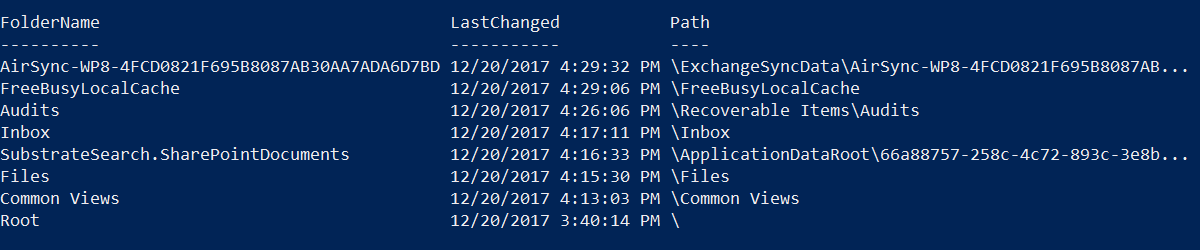 To make it more consumable for others, I prettied it up and put it into a script. You can download the script or copy the code below (after expanding).
 Get-FoldersWithContentChanges.ps1 (5.6 KiB)
|
1 2 3 4 5 6 7 8 9 10 11 12 13 14 15 16 17 18 19 20 21 22 23 24 25 26 27 28 29 30 31 32 33 34 35 36 37 38 39 40 41 42 43 44 45 46 47 48 49 50 51 52 53 54 55 56 57 58 59 60 61 62 63 64 65 66 67 68 69 70 71 72 73 74 75 76 77 78 79 80 81 82 83 84 85 86 87 88 89 90 91 92 93 94 95 96 97 98 99 100 101 102 103 104 105 106 107 108 109 110 111 112 113 114 115 116 117 118 119 120 121 122 123 124 125 126 127 128 129 |
<# .Synopsis Get folders that have had recent content changes .Description Search a mailbox for folders that have changed content in the last number of specified minutes .Parameter EmailAddress Email address of the mailbox to search .Parameter MinutesBeforeNow Integer value of the number of minutes before now to set as a search restriction. Default is 30. .Example Get-FoldersWithContentChanges.ps1 johndoe@company.com .Example Get-FoldersWithContentChanges.ps1 -EmailAddress johndoe@company.com -MinutesBeforeNow 5 .Notes Version: 1.0 Date: 12/21/17 #> Param ( [Parameter(Position=0,Mandatory=$true,HelpMessage="Email address of mailbox")][string]$EmailAddress, [Parameter(Position=1,Mandatory=$false)][int]$MinutesBeforeNow = 30 ) function Convert-HexToASCII($hex) { $text = "" for ($i=0;$i -lt $hex.Length;$i++) { $text = $text + [Convert]::ToString([Convert]::ToChar([Convert]::ToInt32($hex.Substring($i,2),16))) $i++ } return $text } #Check for EWS API $apiPath = (($(Get-ItemProperty -ErrorAction SilentlyContinue -Path Registry::$(Get-ChildItem -ErrorAction SilentlyContinue -Path 'Registry::HKEY_LOCAL_MACHINE\SOFTWARE\Microsoft\Exchange\Web Services' | Sort-Object Name -Descending | Select-Object -First 1 -ExpandProperty Name)).'Install Directory') + 'Microsoft.Exchange.WebServices.dll') if (Test-Path $apiPath) { Add-Type -Path $apiPath } else { Write-Error "The Exchange Web Services Managed API is required to use this script." -Category NotInstalled break } $exchangeVersion = [Microsoft.Exchange.WebServices.Data.ExchangeVersion]::Exchange2010_SP1 $exchangeService = New-Object -TypeName Microsoft.Exchange.WebServices.Data.ExchangeService($exchangeVersion) $exchangeservice.Url = 'https://outlook.office365.com/ews/exchange.asmx' if (-not($creds)) { $creds = Get-Credential } $exchangeService.Credentials = New-Object -TypeName Microsoft.Exchange.WebServices.Data.WebCredentials($creds) $changedTimeStart = [datetime]::Now.AddMinutes(-$MinutesBeforeNow) $output = @() #MAPI property types being referenced $propFolderType = New-Object -TypeName Microsoft.Exchange.WebServices.Data.ExtendedPropertyDefinition(13825,[Microsoft.Exchange.WebServices.Data.MapiPropertyType]::Integer) $propFolderLastChanged = New-Object -TypeName Microsoft.Exchange.WebServices.Data.ExtendedPropertyDefinition(0x670A, [Microsoft.Exchange.WebServices.Data.MapiPropertyType]::SystemTime); $propFolderPath = New-Object -TypeName Microsoft.Exchange.WebServices.Data.ExtendedPropertyDefinition(26293, [Microsoft.Exchange.WebServices.Data.MapiPropertyType]::String) $propDisplayName = [Microsoft.Exchange.WebServices.Data.FolderSchema]::DisplayName #Properties to include in search result $ps = New-Object -TypeName Microsoft.Exchange.WebServices.Data.PropertySet([Microsoft.Exchange.WebServices.Data.BasePropertySet]::IdOnly) $ps.Add($propFolderLastChanged) $ps.Add($propFolderPath) $ps.Add($propDisplayName) #Folder view: Search subfolders and return properties in property set $fv = New-Object -TypeName Microsoft.Exchange.WebServices.Data.FolderView(1000) $fv.Traversal = [Microsoft.Exchange.WebServices.Data.FolderTraversal]::Deep $fv.PropertySet = $ps #Search filter: Non-search folders with changed content since last N minutes $sfItem1 = New-Object -TypeName Microsoft.Exchange.WebServices.Data.SearchFilter+IsGreaterThan($propFolderLastChanged,$changedTimeStart) $sfItem2 = New-Object -TypeName Microsoft.Exchange.WebServices.Data.SearchFilter+IsEqualTo($propFolderType,1) $sfCollection = New-Object -TypeName Microsoft.Exchange.WebServices.Data.SearchFilter+SearchFilterCollection([Microsoft.Exchange.WebServices.Data.LogicalOperator]::And) $sfCollection.Add($sfItem1) $sfCollection.Add($sfItem2) #Bind to folder to search from and check its own changed time because the search won't include itself $folderId = New-Object -TypeName Microsoft.Exchange.WebServices.Data.FolderId([Microsoft.Exchange.WebServices.Data.WellKnownFolderName]::Root,$EmailAddress) $baseFolder = [Microsoft.Exchange.WebServices.Data.Folder]::Bind($exchangeService,$folderId,$ps) $lastChangeTime = $null [void]$baseFolder.TryGetProperty($propFolderLastChanged,[ref]$lastChangeTime) if ($lastChangeTime -gt $changedTimeStart) { $row = "" | Select-Object -Property FolderName,LastChanged,Path $row.FolderName = 'Root' $row.LastChanged = $lastChangeTime.ToLocalTime() $row.Path = '\' $output += $row } #Execute search and process results $findFolderResults = $baseFolder.FindFolders($sfCollection,$fv) foreach ($folder in $findFolderResults.Folders) { $row = "" | Select-Object -Property FolderName,LastChanged,Path $row.FolderName = $folder.DisplayName #Get the value of the last commit time $lastChangeTime = $null [void]$folder.TryGetProperty($propFolderLastChanged,[ref]$lastChangeTime) $row.LastChanged = $lastChangeTime.ToLocalTime() #Get the folder path and convert to readable string $folderPathPropValue = $null [void]$folder.TryGetProperty($propFolderPath,[ref]$folderPathPropValue) $byteArray = [Text.Encoding]::UTF8.GetBytes($folderPathPropValue) $hexString = ($byteArray | ForEach-Object {$_.ToString("X2")}) -join '' $hexString = $hexString.Replace("FEFF","5C00") $path = Convert-HexToASCII($hexString) $row.Path = $path $output += $row } if ($output.Length -gt 0) { $output | Sort-Object -Property LastChanged -Descending } else { Write-Output 'No folders have changed content in the specified window.' } |